Shell Tools shell extension
Download Shell Tools 2.6.0 (Microsoft Store) · Version history
If Microsoft Store app does not open from link above try opening web page.
Size: 3MB, Date: February 7, 2024, Windows 7-11
Freeware, does not contain any adware, spyware or bloatware.Note: The Microsoft Store version of the software has an annoyance where the external program you launch with the command ‘File note’, ‘Map to Windows Sandbox’, or ‘Shell Tools settings’ is started behind, not in front of the File Explorer window you are working on. You’ll need to make an additional click on the taskbar icon of the newly launched program to bring it to the front. If that is not acceptable, then manually install the ZIP file version below instead. The issue is caused by the fact that store apps (UWP) have restricted permissions to execute external programs.
ZIP file for manual installation, see Readme file inside the .zip file on how to setup.
If you find Shell Tools useful, please rate it in the Microsoft Store to let others know it is a legit app. Thank you!
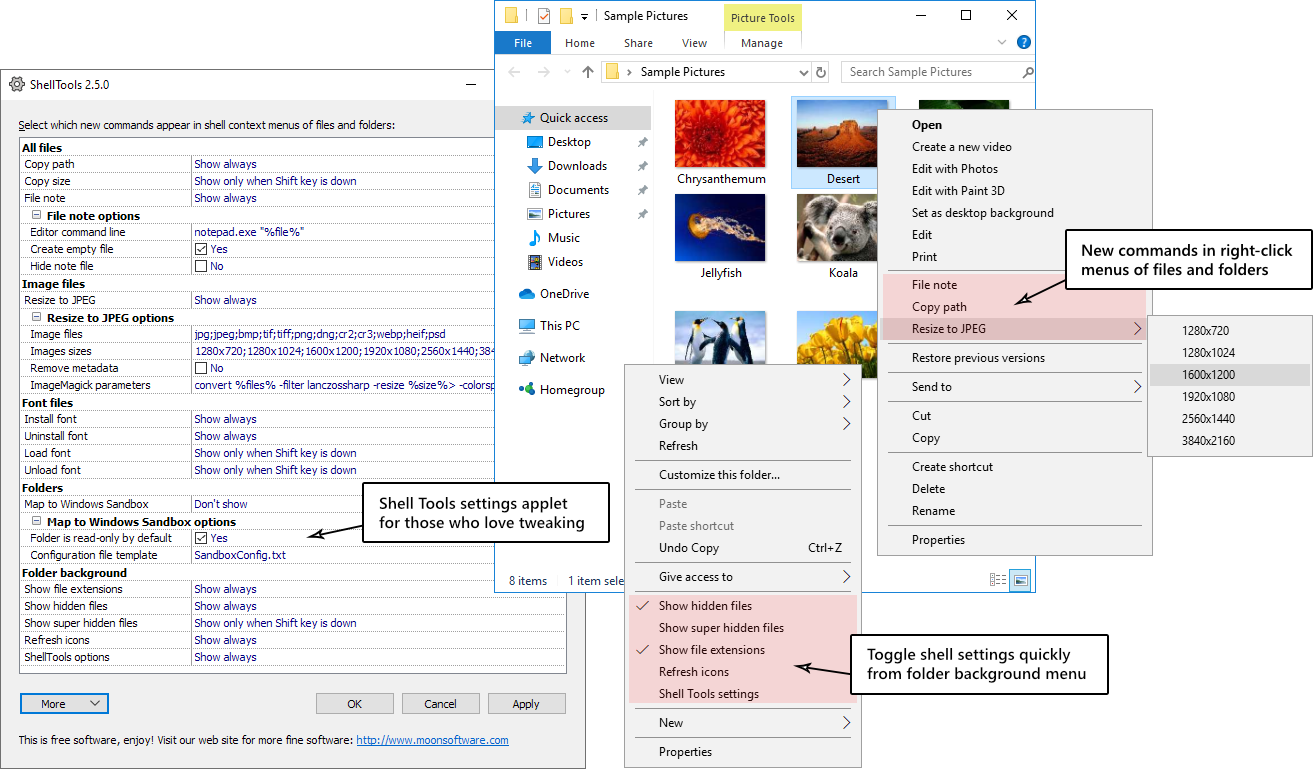
Shell Tools is a free Windows extension that adds some new useful commands to the right-click menus of files and folders. For a full list of new functionality, see the section Shell Tools functionality below.
The supplied configuration program can enable the extension for either the current user (no admin privileges required) or for all users.
Shell Tools functionality
New functionality is added to file, folder, or folder background context (right-click) menus in the Windows shell according to the settings you have selected in Shell Tools settings applet.
Windows 11 has a simplified context menu which by default only shows certain popular commands. To see all context menu commands, including those added by Shell Tools, you should first click the Show more options context menu item. Then, the full context menu is displayed. Alternatively, you can hold down the Shift key when invoking the context menu to display the full context menu immediately.
File note
File note creates new or opens existing text file that has the same base name as selected file to add or edit notes about files. So if you invoke File note for Picture5.jpg then Picture5.txt file will be created or opened to add text note about the file. By default Notepad is used as editor, but you can can configure another editor in settings window. Some 3rd party editors are so smart they do not require empty text file and they will create one automatically when saving. On that case you can unselect Create empty file setting, then when you close editor without adding text, then empty .txt file is not created.
File note command is displayed only if you have single file selected when invoking context menu.
Resize image
Resize image allows you to batch resize one or more selected images to given size and format. The default output format is JPG, but you can change output format as well as target image sizes that are visible in context menu in Shell Tools settings applet. By default resized images will be output to the same folder as source files. To browse different output folder for given batch hold down Ctrl key when invoking the command (clicking on output size in context menu), then Browse for folder window will be displayed. By default metadata (GPS location, title, subject, comments etc) from original image remains in converted images. If you want to remove metadata during conversion, select Remove metadata option in Shell Tools settings applet.
Resize image functionality requires free ImageMagick graphics library to be also installed. Download topmost listed Windows Binary Release Q16-HDRI-x64-dll.exe, unless you have 32-bit system, in which case get Q16-HDRI-x86-dll.exe.
Copy file path
Copies file names of selected files to clipboard. File names are not quoted. By default full path is included in file names, but when you hold down Ctrl key when invoking the command, file names are copied without full path.
Windows 11 has now also built-in Copy as path command in simplified context menu, this copies double-quoted file names with full path.
Show hidden items
Show hidden items command available in folder background menu toggles visibility of hidden files and folders (except super hidden operating system files).
Windows 11 has now similar command in File Explorer toolbar (View > Show > Hidden items), in older versions it took more effort to reach this functionality. If you prefer to use the toolbar button then you can hide duplicate Shell Tools command by Shell Tools settings applet.
Show super hidden items
Show super hidden items command available in folder background menu toggles visibility of super hidden operating system files and folders (which are not displayed when you invoke usual Show hidden items described above). By default this item is only visible if you invoked context menu when holding down Shift key. You can make it always visible by Shell Tools settings applet.
Show file name extensions
Show file name extensions command available in folder background menu toggles visibility of file name extensions.
Windows 11 has now similar command in File Explorer toolbar (View > Show > File name extensions), in older versions it took more effort to reach this functionality. If you prefer to use the toolbar button then you can hide duplicate Shell Tools command by Shell Tools settings applet.
Refresh icons
Refresh icons command available in folder background menu lets Windows to rebuild shell icon cache, which in turn may fix issues with outdated or “ghost” icons and thumbnails.
Install font/Uninstall font/Load font/Unload font
Installs fonts in-place or loads fonts without permanent installation. In-place installation means that font files remain where they are, these files are not copied to system Fonts folder (literally shortcuts to fonts are made, without “overloading” Fonts folder with files). Windows also has built-in context menu command Install font that will install font by copying it to system Fonts folder – that is the difference with Shell Tools, which also installs, but does not copy font files. Contrary to installing fonts, loading fonts just makes them available in current Windows session only, loaded fonts are not automatically available next time you start Windows. So this is useful if you work on a project that requires certain rarely used fonts, so you don’t need to keep these permanently installed. These commands are available in context menu of font files and also in context menus of folders containing fonts, the latter allows processing of all fonts within the folder and it’s sub-folders.
Less used Load font and Unload font commands are not shown by default, but when holding down Shift key when invoking the context menu. You can make them always visible by Shell Tools settings applet.
Map to Windows Sandbox
Map to Windows Sandbox command is added to context menus of folders and that will launch Windows Sandbox (requires separate installation) with these folders mapped, so you have access to the folders from within the launched sandbox. By default mapped folders are read-only, but to allow read-write access you can unselect Folder is read-only by default in Shell Tools settings applet. If you need more sandbox configuration then you can specify your own configuration file template, however, it needs to have %mappedfolder% variable where mapped folder(s) are inserted by Shell Tools.
Default configuration file SandboxConfig.txt, which you can copy to override with your own template file:
<Configuration>
    <MappedFolders>
        %mappedfolder%
    </MappedFolders>
</Configuration>
Copy file size
Copies to clipboard total size of selected files as rounded whole number in bytes, KiB (1024 bytes) or MiB (1024 * 1024 bytes). To copy in KB (1000 bytes) or MB (1000 * 1000 bytes) hold down Ctrl key when invoking the command.
Settings applet
Shell Tools settings applet allows you to configure the shell extension. You can hide the commands you do not use to de-clutter context menus. The applet can be run from folder background context menu and if you have installed Shell Tools from Microsoft Store, then also from Start Menu. If you installed manually from .zip file then you can run ShellToolsConfig.exe from the folder where you extracted the files to.