Copiaris 2.3.5
Released September December 31, 2023 for Windows 7-11 Version history · FAQ
DownloadBuy now $24.99 new user / $14.99 upgrade from Backup Magic.
This Lite version is free for private and commercial use but has some limitations. The free Lite version can be turned into Unlimited version by purchased license key.
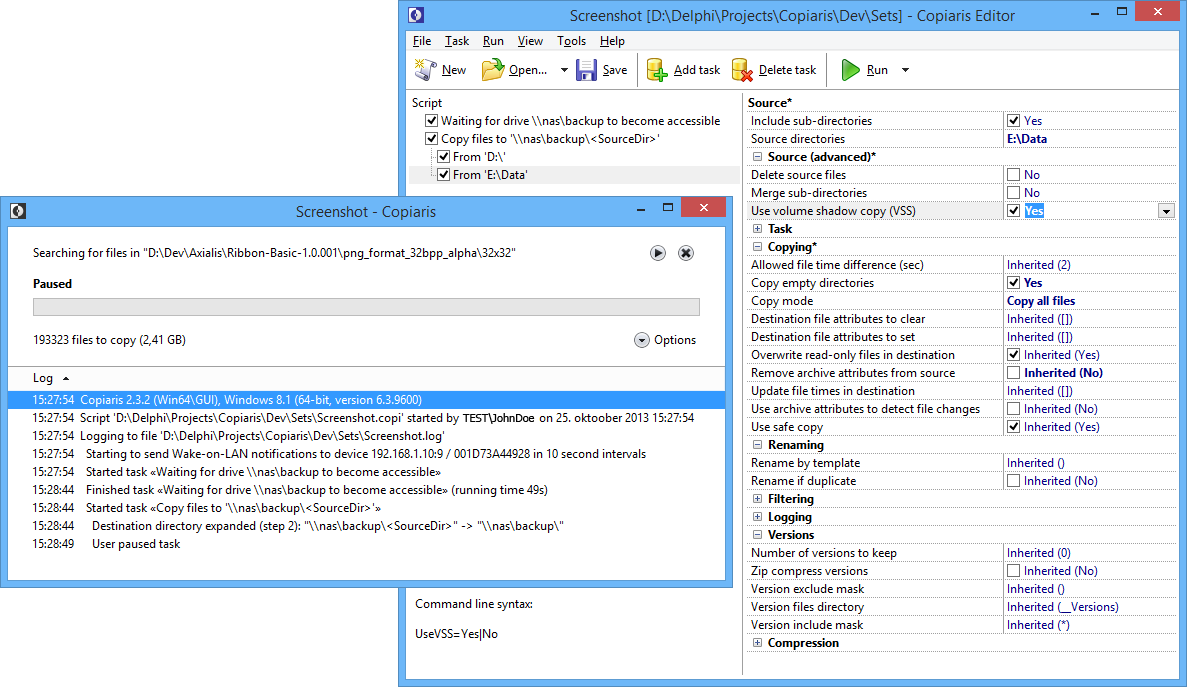
Copiaris (formerly Backup Magic) is a file copy, backup and automation tool for advanced users and IT professionals. It allows to design and execute foolproof click-to-run or unattended file copy scenarios that are as simple or as complicated as needed. Both console (CLI) and graphical user interface (GUI) versions are included.
File copy features:
Extended length and Unicode file names supported.
Volume Shadow Services (VSS) support, both 32-and 64-bit.
File versions - keep 0 to unlimited number of old versions of files in destination or in another location.
Zip compression with AES encryption and Unicode file names, including option to store each first-level sub-directory in separate zip file.
Each source directory and copy task can use different copy options and filters if required.
Merge files from multiple source directories or sub-directories to one directory.
Batch rename files during copying by template, can also rename copied files on file name collision to prevent overwriting.
Extensive file filtering (include/exclude by name or attributes, file size, file age).
Extensive support for variables, including nested and user variables. It is possible to prompt for password, directory, file name or text string at runtime using variables. It is possible to pass parameters to variables, for example when reading from registry you can pass default value that is returned when reading registry fails or specified key or value does not exist.
Other features:
Comes in both console and graphical user interface (GUI) modes.
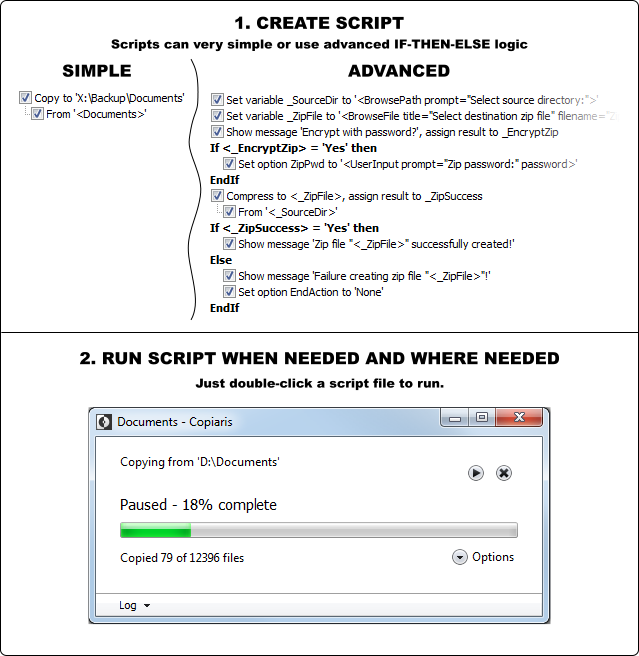
Create advanced scripts with if-then-else blocks and user variables.
Respectable command line support - any available option can be passed by command line and program can be controlled completely from command line without using script files.
Send e-mail with attachments and notify about success or failure of remote script by e-mail.
Built-in Wake-on-LAN (WOL) support allows to wake up sleeping remote computers/NAS devices.
Detailed logging and detailed error messages - no solving of cryptic error messages.
Simple to administer:
Robust and self-contained native Unicode 32- and 64-bit executable - no hassle with runtime requirements.
Can run directly from network share or flash drive, no local installation is needed.
Uses plain file copy without creating any backup catalog files to copy or version files. You always know where files are be copied and are stored. No dependencies to restore files, just copy required files back to their original location.
Smart:
Automatic UAC elevation - prompts for user rights elevation only if current script requires elevated privileges.
Script launcher automatically starts proper 32- or 64-bit executable according to user operating system.
Uses minimal disk I/O to offer high performance, especially noticeable when copying over network.
Shadow copy is only created when there are new or modified files to copy.
If requesting shadow copy fails because another process is already requesting Copiaris tries again after short wait instead of returning failure.
Scripts can be very simple or use advanced if-then-else logic
Sounds interesting? Download free Lite version now and see for yourself.
Limitations in free Lite verison
You can use some tasks only once in your script. Tasks and statements that are not limited in Lite version are set variable, set option, show message and IF/ELSE/ENDIF statements – these can occur as many times as required in your script. Other task types are only allowed to occur once in your script.
You can specify only one source directory. Due to this you may also not be able to use variable if it returns multiple directories.
File versions can be set to either disabled (0) or unlimited (-1), you can’t explicitly set number of version to keep, like 5.
Values of the following options are disabled (default values will be used): Copy empty directories, Reset archive attributes of copied files, Include directories mask, Versions directory, Zip compress versions, Zip comment, Zip encryption method.